


Quick Answer:
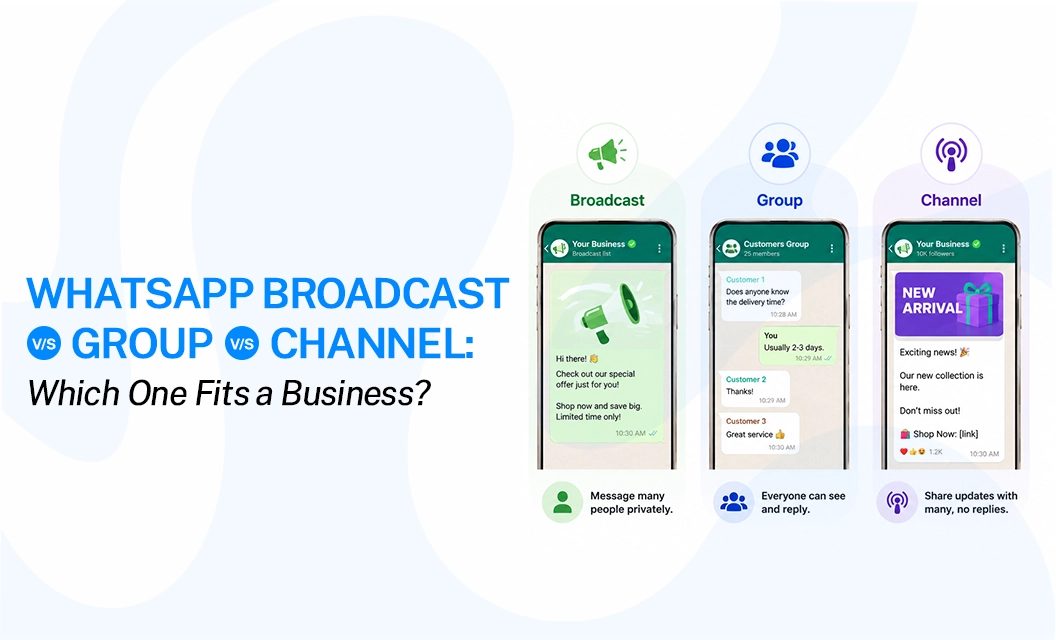
A WhatsApp broadcast sends one message to many contacts as separate private chats, good for quiet, personal updates to people who already have your number saved.
A group is a shared conversation where everyone can see and reply to everyone else, good for discussion, not promotion.
A channel is a one-way public feed anyone can follow, even strangers, good for reach without saved contacts.
Each one solves a different problem, and picking the wrong one usually means wasted effort or an annoyed audience. In this guide, let's explore the meaning, difference, and which communication channel pick is right for your business requirements.
What Is a WhatsApp Broadcast List?
A broadcast list is a saved group of contacts you can message repeatedly without reselecting them each time. When you send a broadcast, each recipient gets it as a normal one-on-one chat. They don't know who else is on the list, and if they reply, only you see it.
According to the WhatsApp Help Center, there's one hard requirement: every contact on your list must have your number saved in their own address book. If they haven't saved you, they simply won't get the message.
When it works well: a boutique owner messaging 150 regular customers about a restock, or a consultant sending a monthly note to existing clients. It feels personal because it is a private message, just sent to many people at once.
Where it breaks down: any list larger than a few hundred people, or any audience that hasn't saved your number. At that point you're not looking at a broadcast list problem—you're looking at a scale problem, which is where the WhatsApp broadcast feature inside the official Business Platform takes over.
What Is a WhatsApp Group?
A group is a shared chat room. Everyone added can see the full member list, read every message, and reply to the whole group. It's built for conversation, not announcements.
Groups now hold up to 1024 members, but the size is not the limiting factor for business use; visibility is. Every member sees every other member's phone number by default, and anyone can jump in, ask off-topic questions, or spam the thread. For a support community, a course cohort, or a small group of loyal fans who genuinely want to talk to each other, that's fine. For a promotional list, it's a liability: one irritated customer can derail the whole conversation, and there's no way to keep it strictly one-directional.
When it works well: a fitness coach running a small accountability group or a local business hosting a customer feedback circle.
Where it breaks down: marketing, announcements, or anything where privacy and control matter more than discussion.
What Is a WhatsApp Channel?
A channel is a one-way broadcast feed that lives in the Updates tab. Anyone can follow it, including people who've never saved your number or messaged you before — and only admins can post. Followers can react to posts, but they can't reply directly or see who else is following, which keeps the feed clean no matter how large it grows.
This is the closest the consumer app gets to public, at-scale publishing. There's no official follower cap the way there is for broadcast lists or groups, which makes channels a decent fit for brand updates, news, or content you want to push out publicly without managing a contact list at all.
When it works well: publishing product drops, event updates, or content to an open audience that opts in by following, not by handing you their number.
Where it breaks down: anything transactional or personalized—order updates, appointment reminders, and support replies—since channels can't send 1:1 messages or handle two-way conversations.
WhatsApp Broadcast vs Group vs Channel: Comparison Table
WhatsApp Broadcast vs Group vs Channel: Which One Should Your Business Choose?
The decision becomes easier when you start with your goal rather than the feature.
Choose a broadcast if you want to reach customers directly. Broadcasts are useful for sales campaigns, offers, reminders, customer updates, follow-ups, and re-engagement. This is the best option when the communication is intended for specific customers and you don't want them interacting in a shared space.
Choose a group if you want to build a community. Groups are useful for customer communities, courses, events, workshops, support communities, and team discussions. A group is about conversation, not just distribution.
Choose a channel if you want to build an audience. Channels are useful for sharing regular content, announcements, industry updates, brand news, tips, and other public-facing communication. A channel works particularly well when people are following your business because they want to hear from you regularly.
Broadcast List vs Group: Which Is Better for Customer Communication?
If you're comparing a broadcast list vs a group specifically for customer communication, broadcast is usually the better choice when privacy and direct communication matter.
With a broadcast, customers receive the message individually and don't see who else received it. With a group, customers participate in the same conversation and can see the other members according to the group's settings.
For example, imagine an online store wants to announce:
"Flat 20% off on selected products this weekend."
A broadcast allows the business to send the promotion directly to its customer list without creating a shared conversation. A group would create unnecessary discussion around a simple promotion.
Use a group instead when:
Customers need to ask questions publicly.
Members benefit from interacting with each other.
You are building a community.
The conversation itself is valuable.
WhatsApp Channel vs Broadcast: Which Is Better for Marketing?
Both can help a business reach an audience, but they serve different purposes.
A Channel is better for ongoing content and audience building. A broadcast is better when you have a specific customer audience and a specific message or action in mind.
For example:
Channel: "5 WhatsApp marketing tips every small business should know."
Broadcast: "Hi {{1}}, our WhatsApp marketing workshop starts tomorrow at 11 AM. Here's your joining link: {{link}}."
This distinction is especially important because WhatsApp's business messaging tools are designed around customer interactions and relevant business communication. Meta says businesses using the WhatsApp Business Platform can send business-initiated messages to customers who have opted in, using message templates.
Why Businesses Eventually Move to WhatsApp Business API
Broadcast lists, groups, and channels all live inside the free consumer app, and they're genuinely useful at a small scale. But every one of them has a wall built into it—a contact limit, a privacy trade-off, or the total absence of two-way, trackable messaging. Once a business needs consistent delivery, opt-in management, automation, or reporting, the consumer tools stop being enough.
That's a different product, with different rules and its own cost structure. If you're weighing whether it's time to move, our WhatsApp Business API guide walks through how the API actually works, and the WhatsApp API pricing page breaks down what it costs before you commit.
Quick Decision Guide
Still not sure which WhatsApp option to choose? Here are a few quick examples to help you decide:
Conclusion:
There is no single "best" WhatsApp option for every business. If you want to reach customers directly, use a broadcast. If you want customers to talk and interact with each other, use a group. If your goal is to build an audience around regular updates, a channel is the better fit. And if you need automation, CRM integration, or structured messaging at scale, look beyond the basic app features toward the WhatsApp Business API.
Frequently Asked Questions
Is WhatsApp broadcast better than a group for business?
For direct customer communication, usually yes. A broadcast keeps conversations separate, so customers don't see or interact with the other recipients. A group is better when interaction between members is part of the purpose, such as a community, course or event discussion.
What is the difference between WhatsApp broadcast and Channel?
A broadcast is better for sending direct messages to selected customers, while a Channel is designed for people to follow ongoing updates from an admin. Channels are one-way communication spaces within WhatsApp's Updates tab, whereas broadcast messages arrive as individual chats.
Can a business use both WhatsApp Channel and Broadcast?
Yes. They can serve different purposes. A business could use a channel to share regular tips, announcements, and content while using broadcasts for specific customer communication such as reminders, offers, or updates.
Should a business use a WhatsApp group for marketing?
A group can work for community-led marketing, but it is usually not the best choice for sending regular promotional messages to a customer list. Groups are designed around shared conversations, so frequent promotions can make the group noisy and reduce its value for members.
Is the WhatsApp Business API the same as WhatsApp broadcast?
No. The WhatsApp Business Platform is an API-based business messaging system. It can be used to send business-initiated messages through approved templates and connect WhatsApp with business systems. A broadcast list is an app-level feature for sending the same message to multiple contacts separately.
Start with the communication goal first, then choose the tool that supports it. When you're ready to run customer broadcasts at scale, explore Emovur's WhatsApp broadcast solution.
TABLE OF CONTENTS


