

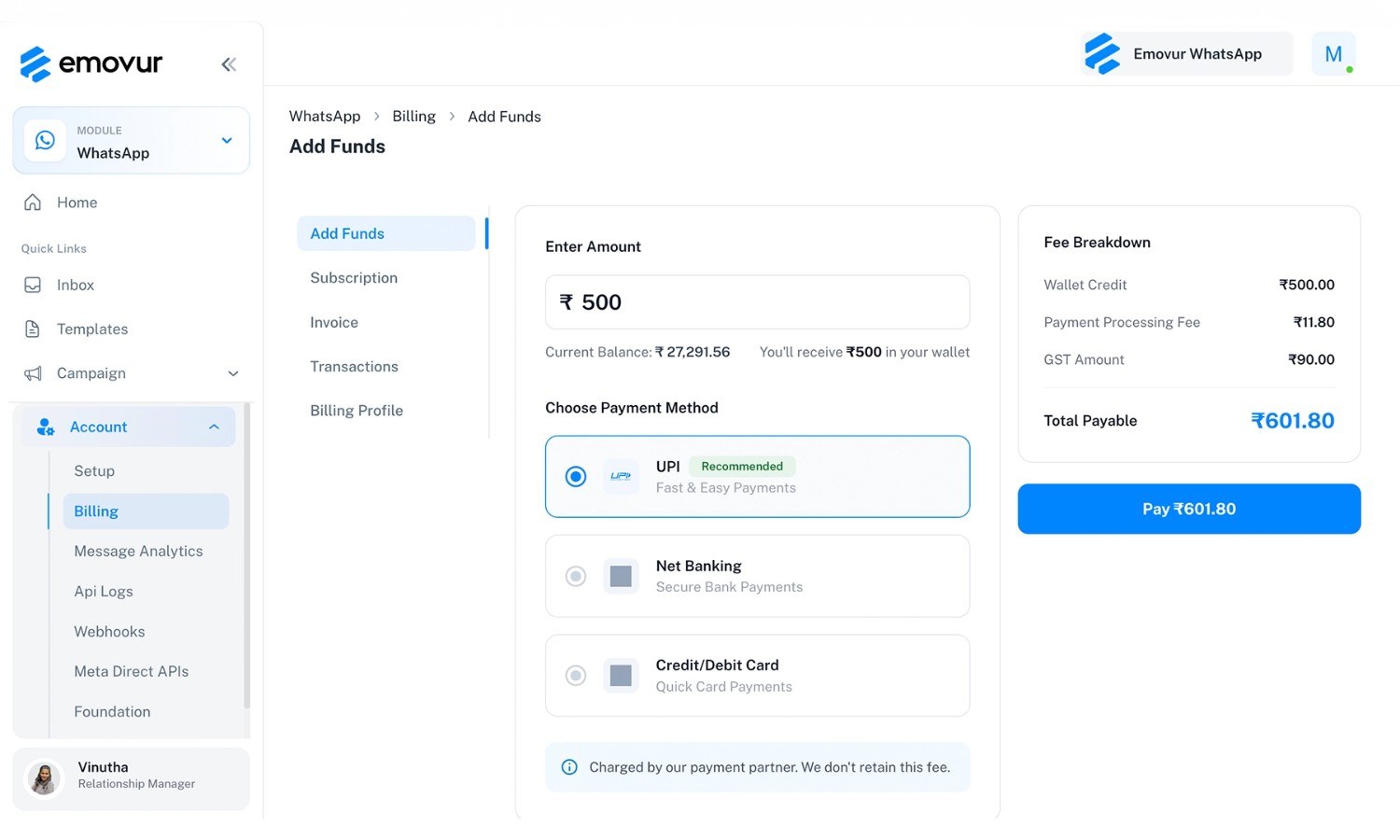
You open the billing page. You type ₹500. The button says Pay ₹601.80.
If that made you pause, good. Most people do, and most providers never explain it. The gap is not a trick. But it is the first sign that WhatsApp API billing has more moving parts than a simple monthly bill.
Here is the full picture, using a real recharge screen from the Emovur dashboard, so you know exactly where your money goes before you add a rupee.
Where does the extra ₹101.80 come from?
When you add funds, the screen shows a fee breakdown before you pay:
Line Item | Amount | What it is |
Wallet credit | ₹500.00 | What lands in your wallet, in full |
Payment processing fee | ₹11.80 | Charged by the payment partner |
GST amount | ₹90.00 | Works out to 18% of the wallet credit |
Total payable | ₹601.80 | What you actually pay |
Two things matter here. First, you receive the full ₹500 in your wallet. The extras are added on top, not cut from it. Second, the processing fee goes to the payment partner. The dashboard says plainly that Emovur does not retain it.
The GST line is also why a clean ₹500 turns into an odd number. If you recharge for business, this is the amount to expect on your invoice too.
What actually drains the wallet?
The wallet is not a subscription. It is a prepaid balance that your messages draw down.
Meta charges per delivered template message. The rate depends on two things: the category of the template (marketing, utility or authentication) and the country of the person receiving it. A marketing template costs more than a utility one. A message to a +91 number uses India’s rate.
Meta also changes these rates and the rules around the 24-hour customer service window from time to time, so always check Meta’s official rate card for the latest. For how this plays out on a real plan, our WhatsApp API pricing page shows what you pay on top of Meta.
A simple way to plan your first recharge: count how many messages you expect to send in each category this month, multiply by the current rate, and add a small buffer.
How do you recharge without losing a campaign halfway? A 1-minute walkthrough
Go to Account > Billing and open Add Funds.
Enter the amount. The screen shows your current balance and what you will receive.
Pick a payment method: UPI (marked recommended), Net Banking, or Credit/Debit Card.
Check the fee breakdown on the right.
Click Pay.
Your balance updates, and you get a reminder when the wallet is about to run empty. That reminder is useful. A wallet that hits zero during a broadcast is the most common billing surprise.
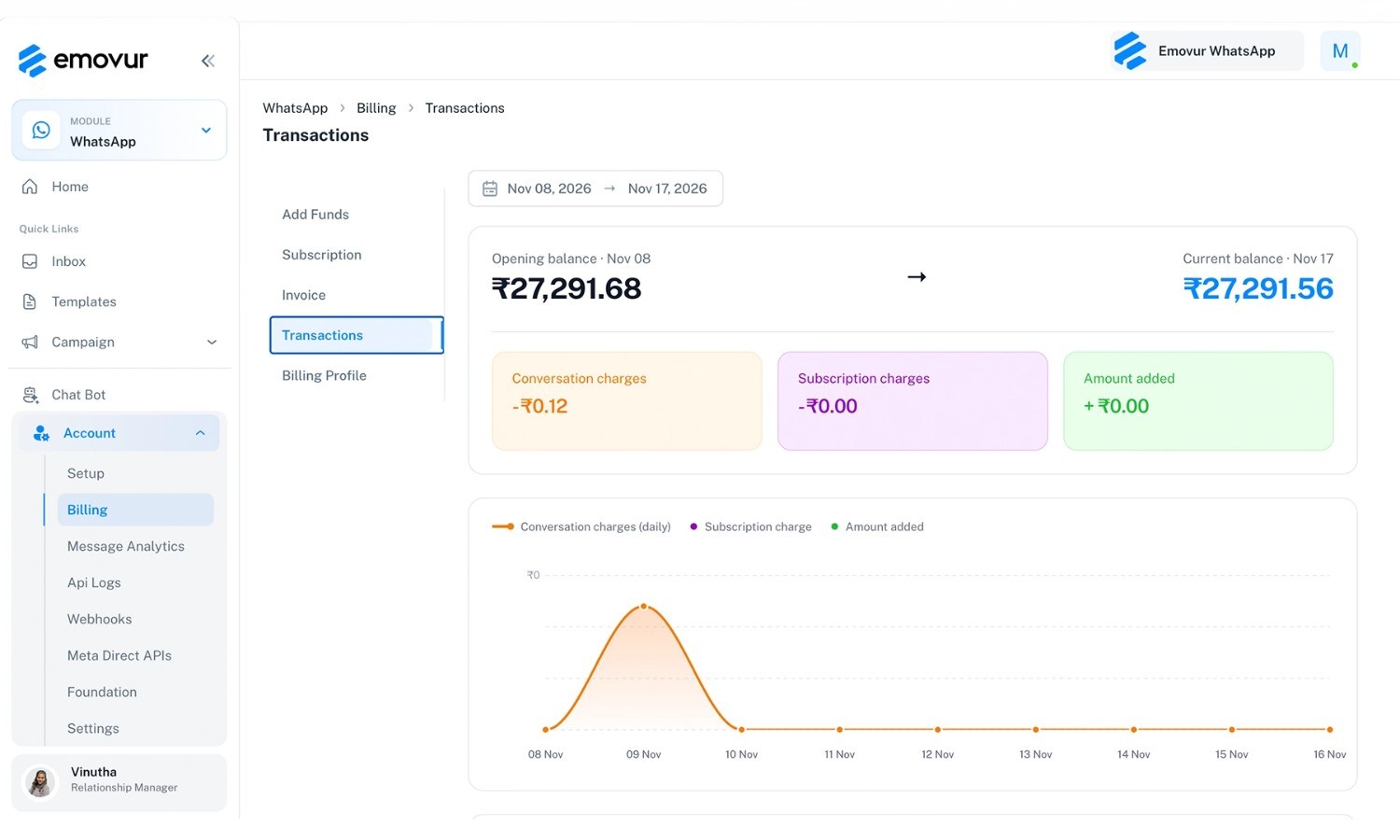
Where do invoices and transaction history live?
Everything sits in the same Billing area, in separate tabs:
Transactions: show every recharge and payment, so you can trace where money went.
Invoice: lets you download invoices from the dashboard without raising a ticket.
Subscription: is where plan payments are made.
Billing Profile: holds the details your invoices are issued against, so fill it in before your first recharge.
4 questions to ask any WhatsApp API provider before you recharge
Billing confusion usually starts with what the provider does not show you. Ask these:
Do you show a fee breakdown before I pay? You should see wallet credit, fees and tax separately.
Do you add anything on top of Meta’s rate? Some providers add platform fees or charge add-ons depending on the integration you pick.
Can I download invoices myself? If it needs a support ticket, expect delays at tax time.
Will I know before my wallet runs out? Alerts save campaigns.
If you want to compare, start with Emovur’s pricing and ask other providers the same four questions.
Know your numbers before you send
Now you can read a billing screen like a pro. See the full cost structure on the Emovur WhatsApp API pricing page, or book a demo and we’ll walk through your first recharge with you.
Frequently asked questions?
Why do I pay more than the amount I add to my wallet?
The wallet credit is what you choose, for example ₹500. On top of it, the checkout adds a payment processing fee charged by the payment partner, plus GST. You see all three before you pay, and the full amount you chose lands in your wallet.
What happens when my WhatsApp API wallet runs low?
Meta’s charges are taken from your wallet balance as messages are sent, so the balance goes down with usage. Emovur sends a reminder when the wallet is about to run empty, so you can recharge before your next campaign. It is a good habit to recharge before a large broadcast, not during it.
Where can I download my WhatsApp API invoices?
Open the Billing section in your dashboard and go to the Invoice tab. You can download invoices there directly. Update your Billing Profile first, so your business details are correct on every invoice.
How much should I recharge the first time?
Start with a rough estimate: the number of messages you plan to send each month in each category, times Meta’s current rate for that category, plus a small buffer. Many teams begin with one campaign’s worth and top up as they see real usage in the Transactions tab.
Are there hidden charges on top of Meta’s message rates?
Meta’s message charges are one layer. Provider fees, such as a subscription or platform fee, are the other. Subscription payments are made separately from wallet recharges, and the recharge screen shows its fee breakdown before you pay. Always check the pricing page of any provider for what sits on top of Meta.
People Also Look for ?
WhatsApp API Pricing in India: What You Actually Pay
Emovur vs WATI vs AiSensy vs Interakt: Pricing Compared (2026)
WhatsApp Business API Pricing in India (2026): What Changed on Oct 1